Showing posts with label Mobile. Show all posts

Tuesday, 18 November 2014

Google Drive for Android & iOS

Google Drive is the most useful app to have on your Android and iOS devices to have full access of your data from anywhere online. So check out how to use Google Drive on your Android and iOS devices. When you first launch the app, you'll find a list of your folders and files stored in Google Drive. The default thumbnail view can be changed to a list view (middle) by tapping on the list icon in the top menu bar.

Tap to an item to open it → Tap on “i” icon, it will open the details screen for the files or folders → there you can view who has access, what changes were made, who made them and other details → Also you will find option for sharing, moving, deleting, renaming, download options to your devices for offline access.


Google Drive App for Android & iOS

The Google Drive app for Android is updated with new Material Design language with a floating “New” button and fun animations. Tap on a circular red button will bring a prompt → there you will find options to create new doc, upload a file, scan a doc, create a folder and creating a Docs, Sheets or Slides document.

The Google Drive app for iOS users will soon to have same design update but till the time tap on the “+” in the upper-right hand corner to create new doc. The other options required app to be installed on your device. Viewing documents without the above apps installed is still possible, though your editing options will be limited.

Android users can have access to images, videos, audio and downloads where as iOS users are restricted to videos and images only. Android users install a file manager, such as Astro File Manager, is required to browse all files stored on your device.

Keep in mind if you want to place the new item in a specific folder, you will need to navigate to that folder in the app before you upload or create it. Otherwise the new file uploaded item will be placed in the root directory of your Google Drive account.

For Android app development visit here and For iOS app development visit here

How to use Google Drive on Android and iOS?

Google Drive for Android & iOS

Google Drive is the most useful app to have on your Android and iOS devices to have full access of your data from anywhere online. So check out how to use Google Drive on your Android and iOS devices. When you first launch the app, you'll find a list of your folders and files stored in Google Drive. The default thumbnail view can be changed to a list view (middle) by tapping on the list icon in the top menu bar.

Tap to an item to open it → Tap on “i” icon, it will open the details screen for the files or folders → there you can view who has access, what changes were made, who made them and other details → Also you will find option for sharing, moving, deleting, renaming, download options to your devices for offline access.


Google Drive App for Android & iOS

The Google Drive app for Android is updated with new Material Design language with a floating “New” button and fun animations. Tap on a circular red button will bring a prompt → there you will find options to create new doc, upload a file, scan a doc, create a folder and creating a Docs, Sheets or Slides document.

The Google Drive app for iOS users will soon to have same design update but till the time tap on the “+” in the upper-right hand corner to create new doc. The other options required app to be installed on your device. Viewing documents without the above apps installed is still possible, though your editing options will be limited.

Android users can have access to images, videos, audio and downloads where as iOS users are restricted to videos and images only. Android users install a file manager, such as Astro File Manager, is required to browse all files stored on your device.

Keep in mind if you want to place the new item in a specific folder, you will need to navigate to that folder in the app before you upload or create it. Otherwise the new file uploaded item will be placed in the root directory of your Google Drive account.

For Android app development visit here and For iOS app development visit here

This entry was posted in :

Thursday, 13 November 2014

Nexus 6

For Comparison between Nexus 6 Vs Nexus 5 and 
For Nexus 6 Android Lollipop Apps making visit here

Nexus 6 also known as Motorola Nexus 6. Check out the specifications of the Phone.

Motorola Nexus 6 Specifications

1) SIM - Nano-SIM

2) Display Size:- 1440 x 2560 pixels, 5.96 inches (~493 ppi pixel density)

3) Display Type:- AMOLED capacitive touchscreen, 16M colors

4) Protection:- Corning Gorilla Glass 3

5) Memory Card Slot:- No
                   Internal Storage:- 32/64 GB, 3 GB RAM

6) Camera Primary:- 13 MP, 4128 x 3096 pixels, autofocus, optical image stabilization, dual-LED (ring) flash
                  Secondary:- 2 MP

7) OS:- Android OS, v5.0 (Lollipop)

8) Chipset:- Qualcomm Snapdragon 805

9) CPU:- Quad-core 2.7 GHz Krait 450

10) Colors:- Midnight Blue, Cloud White

11) Battery:- Non-removable Li-Po 3220 mAh battery

12) Price:- 570 EUR

Google Nexus 6 Specifications

Nexus 6

For Comparison between Nexus 6 Vs Nexus 5 and 
For Nexus 6 Android Lollipop Apps making visit here

Nexus 6 also known as Motorola Nexus 6. Check out the specifications of the Phone.

Motorola Nexus 6 Specifications

1) SIM - Nano-SIM

2) Display Size:- 1440 x 2560 pixels, 5.96 inches (~493 ppi pixel density)

3) Display Type:- AMOLED capacitive touchscreen, 16M colors

4) Protection:- Corning Gorilla Glass 3

5) Memory Card Slot:- No
                   Internal Storage:- 32/64 GB, 3 GB RAM

6) Camera Primary:- 13 MP, 4128 x 3096 pixels, autofocus, optical image stabilization, dual-LED (ring) flash
                  Secondary:- 2 MP

7) OS:- Android OS, v5.0 (Lollipop)

8) Chipset:- Qualcomm Snapdragon 805

9) CPU:- Quad-core 2.7 GHz Krait 450

10) Colors:- Midnight Blue, Cloud White

11) Battery:- Non-removable Li-Po 3220 mAh battery

12) Price:- 570 EUR

This entry was posted in :

Wednesday, 12 November 2014

Microsoft Lumia 535

Microsoft finally launched the first Lumia smart phone called Microsoft Lumia 535. The new Lumia smartphone will be in two variants - single SIM (with the same name) and dual-SIM, called the Lumia 535 Dual SIM. The handset will be available starting November. The Microsoft Lumia 535 will first be available in countries such as China, Hong Kong and Bangladesh, with other countries to follow. 


Microsoft Lumia 535

Source:- For Smartphone apps development

Specifications of Microsoft Lumia 535

1) SIM:- Micro-SIM

2) Display type:- IPS LCD capacitive touchscreen, 16M colors

3) Display Size:- 540 x 960 pixels, 5.0 inches (~220 ppi pixel density)

4) Display Protection:- Corning Gorilla Glass 3

5) Memory:- Card Slot:- microSD, up to 128 GB
                     Internal:- 8 GB, 1 GB RAM

6) Camera:- Primary:- 5 MP, 2592 x 1936 pixels, autofocus, LED flash
                     Secondary:- 5 MP

7) OS:- Microsoft Windows Phone 8.1

8) Chipset:- Qualcomm Snapdragon 200

9) CPU:- Quad-core 1.2 GHz Cortex-A7

10) Colors:- Orange, green, white, black, gray, blue

11) Battery:- Li-Ion 1905 mAh battery (BL-L4A)

12) Price:- 140 EUR

Microsoft Lumia 535 Specifications

Microsoft Lumia 535

Microsoft finally launched the first Lumia smart phone called Microsoft Lumia 535. The new Lumia smartphone will be in two variants - single SIM (with the same name) and dual-SIM, called the Lumia 535 Dual SIM. The handset will be available starting November. The Microsoft Lumia 535 will first be available in countries such as China, Hong Kong and Bangladesh, with other countries to follow. 


Microsoft Lumia 535

Source:- For Smartphone apps development

Specifications of Microsoft Lumia 535

1) SIM:- Micro-SIM

2) Display type:- IPS LCD capacitive touchscreen, 16M colors

3) Display Size:- 540 x 960 pixels, 5.0 inches (~220 ppi pixel density)

4) Display Protection:- Corning Gorilla Glass 3

5) Memory:- Card Slot:- microSD, up to 128 GB
                     Internal:- 8 GB, 1 GB RAM

6) Camera:- Primary:- 5 MP, 2592 x 1936 pixels, autofocus, LED flash
                     Secondary:- 5 MP

7) OS:- Microsoft Windows Phone 8.1

8) Chipset:- Qualcomm Snapdragon 200

9) CPU:- Quad-core 1.2 GHz Cortex-A7

10) Colors:- Orange, green, white, black, gray, blue

11) Battery:- Li-Ion 1905 mAh battery (BL-L4A)

12) Price:- 140 EUR

This entry was posted in :

Friday, 17 October 2014


Nexus 5 and Nexus 6 has major comparisons to do in terms of design, hardware, costing and others. It is worth to get into this differences before buying Nexus 6 with new Android Lollipop. Lets dive in to check what are the areas of comparison. From the design to its specifications everything is checked.

Comparison between Nexus 6 Vs Nexus 5


Sr.No
Features
Nexus 6
Nexus 5
1
Name
Motorola Nexus 6
LG Nexus 5

2
SIM
Nano-SIM
Micro-SIM

3
Display
AMOLED capacitive touchscreen, 16M colors
True HD IPS+ capacitive touchscreen, 16M colors

4
Size
1440 x 2560 pixels, 5.96 inches (~493 ppi pixel density)
1080 x 1920 pixels, 4.95 inches (~445 ppi pixel density)

5
Protection
Corning Gorilla Glass 3

6
Memory
Card Slot :- No
Internal:- 32/64 GB, 3 GB RAM
Card Slot :- No
Internal:- 16/32 GB, 2 GB RAM

7
Camera
Primary:- 13 MP
Secondary:- 2 MP
Primary:- 8 MP
Secondary:- 1.3 MP

8
OS
Android OS, v5.0 (Lollipop)
Android OS, v4.4 (KitKat), upgradable to v4.4.4 (KitKat)

9
Chipset
Qualcomm Snapdragon 805
Qualcomm MSM8974 Snapdragon 800

10
CPU
Quad-core 2.7 GHz Krait 450
Quad-core 2.3 GHz Krait 400

11
Colors
Midnight Blue, Cloud White
Black, White, Red

12
Battery
Non-removable Li-Po 3220 mAh battery
Non-removable Li-Po 2300 mAh battery

13
Price
570 EUR
260 EUR

There is a vast difference in pricing of both the phones and so as features too. Nexus 6 is heavily priced and is loaded with features too with around 6 inch big phone which matters a lot. Look and design is almost different. Think before you buy. You would also need apps on Android Lollipop, sometimes some are not compatible.

Do you want an app of your straight away for Android Lollipop, come and contact here or you can browse here for detailed services in Android Application Development.

Nexus 6 Vs Nexus 5


Nexus 5 and Nexus 6 has major comparisons to do in terms of design, hardware, costing and others. It is worth to get into this differences before buying Nexus 6 with new Android Lollipop. Lets dive in to check what are the areas of comparison. From the design to its specifications everything is checked.

Comparison between Nexus 6 Vs Nexus 5


Sr.No
Features
Nexus 6
Nexus 5
1
Name
Motorola Nexus 6
LG Nexus 5

2
SIM
Nano-SIM
Micro-SIM

3
Display
AMOLED capacitive touchscreen, 16M colors
True HD IPS+ capacitive touchscreen, 16M colors

4
Size
1440 x 2560 pixels, 5.96 inches (~493 ppi pixel density)
1080 x 1920 pixels, 4.95 inches (~445 ppi pixel density)

5
Protection
Corning Gorilla Glass 3

6
Memory
Card Slot :- No
Internal:- 32/64 GB, 3 GB RAM
Card Slot :- No
Internal:- 16/32 GB, 2 GB RAM

7
Camera
Primary:- 13 MP
Secondary:- 2 MP
Primary:- 8 MP
Secondary:- 1.3 MP

8
OS
Android OS, v5.0 (Lollipop)
Android OS, v4.4 (KitKat), upgradable to v4.4.4 (KitKat)

9
Chipset
Qualcomm Snapdragon 805
Qualcomm MSM8974 Snapdragon 800

10
CPU
Quad-core 2.7 GHz Krait 450
Quad-core 2.3 GHz Krait 400

11
Colors
Midnight Blue, Cloud White
Black, White, Red

12
Battery
Non-removable Li-Po 3220 mAh battery
Non-removable Li-Po 2300 mAh battery

13
Price
570 EUR
260 EUR

There is a vast difference in pricing of both the phones and so as features too. Nexus 6 is heavily priced and is loaded with features too with around 6 inch big phone which matters a lot. Look and design is almost different. Think before you buy. You would also need apps on Android Lollipop, sometimes some are not compatible.

Do you want an app of your straight away for Android Lollipop, come and contact here or you can browse here for detailed services in Android Application Development.

This entry was posted in :

Saturday, 2 August 2014

MOTO G Vs LG Nexus 5


MOTO G and LG Nexus 5 both are Android smartphones and both have their own good features and price. Lets compare both the phone with its price, specifications and features.

Comparison between Moto G Vs LG Nexus 5


Comparison for
MOTO G
LG Nexus 5

Body:-
129.9 x 65.9 x 11.6 mm (5.11 x 2.59 x 0.46 in)
137.9 x 69.2 x 8.6 mm (5.43 x 2.72 x 0.34 in)

Display Type:-
IPS LCD capacitive touchscreen, 16M colors
True HD IPS+ capacitive touchscreen, 16M colors

Display Size:-
720 x 1280 pixels, 4.5 inches (~326 ppi pixel density)
1080 x 1920 pixels, 4.95 inches (~445 ppi pixel density)

Display Protection:-
Corning Gorilla Glass 3

Memory:-
Card Slot:- No Internal:- 8/16 GB, 1 GB RAM
Card Slot:- No Internal:- 16/32 GB, 2 GB RAM

Camera:-
Primary:- 5 MP, 2592 Ñ… 1944 pixels, autofocus, LED flash & Secondary:- 1.3 MP
Primary:- 8 MP, 3264 x 2448 pixels, autofocus, optical image stabilization, LED flash & Secondary:- 1.3 MP

OS:-
Android OS, v4.3 (Jelly Bean), upgradable to v4.4.4 (KitKat)
Android OS, v4.4 (KitKat), upgradable to v4.4.4 (KitKat)

Chipset:-
Qualcomm MSM8226 Snapdragon 400
Qualcomm MSM8974 Snapdragon 800

CPU:-
Quad-core 1.2 GHz Cortex-A7
Quad-core 2.3 GHz Krait 400

Colors:-
Black (front panel), 7 color options (back panel)

Black, White, Red
Battery:-
Non-removable Li-Ion 2070 mAh battery
Non-removable Li-Po 2300 mAh battery

Price:-
130 EUR
260 EUR


MOTO G Vs LG Nexus 5 Comparison of Price, Specifications and Features

MOTO G Vs LG Nexus 5


MOTO G and LG Nexus 5 both are Android smartphones and both have their own good features and price. Lets compare both the phone with its price, specifications and features.

Comparison between Moto G Vs LG Nexus 5


Comparison for
MOTO G
LG Nexus 5

Body:-
129.9 x 65.9 x 11.6 mm (5.11 x 2.59 x 0.46 in)
137.9 x 69.2 x 8.6 mm (5.43 x 2.72 x 0.34 in)

Display Type:-
IPS LCD capacitive touchscreen, 16M colors
True HD IPS+ capacitive touchscreen, 16M colors

Display Size:-
720 x 1280 pixels, 4.5 inches (~326 ppi pixel density)
1080 x 1920 pixels, 4.95 inches (~445 ppi pixel density)

Display Protection:-
Corning Gorilla Glass 3

Memory:-
Card Slot:- No Internal:- 8/16 GB, 1 GB RAM
Card Slot:- No Internal:- 16/32 GB, 2 GB RAM

Camera:-
Primary:- 5 MP, 2592 Ñ… 1944 pixels, autofocus, LED flash & Secondary:- 1.3 MP
Primary:- 8 MP, 3264 x 2448 pixels, autofocus, optical image stabilization, LED flash & Secondary:- 1.3 MP

OS:-
Android OS, v4.3 (Jelly Bean), upgradable to v4.4.4 (KitKat)
Android OS, v4.4 (KitKat), upgradable to v4.4.4 (KitKat)

Chipset:-
Qualcomm MSM8226 Snapdragon 400
Qualcomm MSM8974 Snapdragon 800

CPU:-
Quad-core 1.2 GHz Cortex-A7
Quad-core 2.3 GHz Krait 400

Colors:-
Black (front panel), 7 color options (back panel)

Black, White, Red
Battery:-
Non-removable Li-Ion 2070 mAh battery
Non-removable Li-Po 2300 mAh battery

Price:-
130 EUR
260 EUR


This entry was posted in :

Tuesday, 15 July 2014

Xiaomi mi3


Xiaomi launched on tuesday its first smartphone in the indian market. It will be available exclusively on Flipkart from july 22. Xiaomi has become the first handset manufacturer to offer an Android smartphone with a Qualcomm Snapdragon 800 chipset.


Xiaomi mi3

Check out the specifications for Xiaomi Mi 3 Specifications


1) Display:- 

IPS LCD capacitive touchscreen, 16M colors

2) Size:-

1080 x 1920 pixels, 5.0 inches (~441 ppi pixel density) 

3) Memory:-

Card slot - No
internal - 16/64 GB, 2 GB RAM 

4) Camera:-

Primary - 13 MP, 4128 x 3096 pixels, autofocus, dual-LED flash
Secondary - 2 MP, 1080p@30fps 

5) OS:-

Android OS, v4.2.1 (Jelly Bean)

6) Chipsets:-

Qualcomm MSM8274AB Snapdragon 800 

7) CPU:-

Quad-core 2.3 GHz Krait 400

8) Battery:-

Non-removable Li-Ion 3050 mAh battery

9) Price:-

$233 approx.

Xiaomi Mi3 Specifications

Xiaomi mi3


Xiaomi launched on tuesday its first smartphone in the indian market. It will be available exclusively on Flipkart from july 22. Xiaomi has become the first handset manufacturer to offer an Android smartphone with a Qualcomm Snapdragon 800 chipset.


Xiaomi mi3

Check out the specifications for Xiaomi Mi 3 Specifications


1) Display:- 

IPS LCD capacitive touchscreen, 16M colors

2) Size:-

1080 x 1920 pixels, 5.0 inches (~441 ppi pixel density) 

3) Memory:-

Card slot - No
internal - 16/64 GB, 2 GB RAM 

4) Camera:-

Primary - 13 MP, 4128 x 3096 pixels, autofocus, dual-LED flash
Secondary - 2 MP, 1080p@30fps 

5) OS:-

Android OS, v4.2.1 (Jelly Bean)

6) Chipsets:-

Qualcomm MSM8274AB Snapdragon 800 

7) CPU:-

Quad-core 2.3 GHz Krait 400

8) Battery:-

Non-removable Li-Ion 3050 mAh battery

9) Price:-

$233 approx.

This entry was posted in :

Thursday, 10 July 2014

Video Chat Apps

Technology has been to its next level and its proven by showing that anywhere anything we can connect to in this world. Business deals and other chats can be done on phone but its time when we want to actually have face-to-face talks by actually looking at each other. Video chats or Video conferencing are the best option to have look at person's face and talk to the people. Our smart phones are capable of having this. So browse for one and the best video chat apps that you will need in your smart phone. Check out this apps to download for your phone.

Best Video Chat Apps to have on your Smart Phone

1) Skype:-


Skype

Skype is one of the oldest, and probably the most well-known, video chat apps out there. Skype allows its 299 million users to video chat, voice chat, and instant messaging each other.

2) Tango:-


Tango

It’s incredibly simple to use and you don’t need a password, you just need just to enter your phone number, email address, and first name. It’s also free on iOS, Android, and Windows and has some neat features like being able to play darts or tic-tac-toe with friends during a conversation. This is not recommenced, however, during business calls.

3) Viber:-


Viber App

Viber accomplishes all the usual tasks you’re looking for – free text, calling, and photo messages - but you can also share items such as files and your location. Plus, Viber allows group calling for up to 40 participants, just in case need to chat with that many people at once.

4) Hangouts:-


Hangouts app

Since nearly everyone has Google these days, it shouldn’t be difficult to find another person with Hangouts. Besides the typical features – voice and video chat, instant messaging, and group video chat for up to 10 people – you can also share photos and emojis. Also, Hangouts is one of the few apps that allows public, live-streamed video chats.

5) Peer:-


Peer Video Chat app

Looking for a video chat app strictly for business? Peer is the way to go. The app syncs with LinkedIn so professionals can have a face-to-face way to communicate and connect with each other. Peer also includes other nifty features such as the ability to send pre-recorded video messages as invites, or text. As of now, Peer is only available in iTunes, but expect Google play and desk top versions are in the works.


5 Best Video Chat Apps to Have on Your Smart Phone

Video Chat Apps

Technology has been to its next level and its proven by showing that anywhere anything we can connect to in this world. Business deals and other chats can be done on phone but its time when we want to actually have face-to-face talks by actually looking at each other. Video chats or Video conferencing are the best option to have look at person's face and talk to the people. Our smart phones are capable of having this. So browse for one and the best video chat apps that you will need in your smart phone. Check out this apps to download for your phone.

Best Video Chat Apps to have on your Smart Phone

1) Skype:-


Skype

Skype is one of the oldest, and probably the most well-known, video chat apps out there. Skype allows its 299 million users to video chat, voice chat, and instant messaging each other.

2) Tango:-


Tango

It’s incredibly simple to use and you don’t need a password, you just need just to enter your phone number, email address, and first name. It’s also free on iOS, Android, and Windows and has some neat features like being able to play darts or tic-tac-toe with friends during a conversation. This is not recommenced, however, during business calls.

3) Viber:-


Viber App

Viber accomplishes all the usual tasks you’re looking for – free text, calling, and photo messages - but you can also share items such as files and your location. Plus, Viber allows group calling for up to 40 participants, just in case need to chat with that many people at once.

4) Hangouts:-


Hangouts app

Since nearly everyone has Google these days, it shouldn’t be difficult to find another person with Hangouts. Besides the typical features – voice and video chat, instant messaging, and group video chat for up to 10 people – you can also share photos and emojis. Also, Hangouts is one of the few apps that allows public, live-streamed video chats.

5) Peer:-


Peer Video Chat app

Looking for a video chat app strictly for business? Peer is the way to go. The app syncs with LinkedIn so professionals can have a face-to-face way to communicate and connect with each other. Peer also includes other nifty features such as the ability to send pre-recorded video messages as invites, or text. As of now, Peer is only available in iTunes, but expect Google play and desk top versions are in the works.


This entry was posted in :

Monday, 2 June 2014

Xolo Q1000 OPus

Xolo’s Broadcom-powered Q1000 launched late last year now gets an Android 4.4 KitKat update. Check out the Specifications.

Xolo Q1000 OPus


Specifications of Xolo Q1000 Opus:-

Display:- 5 inch 480 x 854 pixels
Memory:- microSD upto 32 GB
Internal Memory:- 4GB, 1GB Ram
Camera:- 5MP
OS:- Android KitKat 4.4
CPU:- Quad core 1.2 GHZ
Chipset:- BCM23550
Battery:- Li-Po 2000 mAh battery 


Xolo Q1000 OPus Rolls Out with Android 4.4 KitKat Today

Xolo Q1000 OPus

Xolo’s Broadcom-powered Q1000 launched late last year now gets an Android 4.4 KitKat update. Check out the Specifications.

Xolo Q1000 OPus


Specifications of Xolo Q1000 Opus:-

Display:- 5 inch 480 x 854 pixels
Memory:- microSD upto 32 GB
Internal Memory:- 4GB, 1GB Ram
Camera:- 5MP
OS:- Android KitKat 4.4
CPU:- Quad core 1.2 GHZ
Chipset:- BCM23550
Battery:- Li-Po 2000 mAh battery 


Monday, 26 May 2014

LG G3

The new LG G3 is all set to Launch on May 27. Its preliminary specifications says that it has got all the new and latest features as per the generation. Probably to arrive in two variants one would be cheaper version would flaunt a plastic build with 2GB of RAM, the premium build might boast the metal design and 3GB of RAM.
 

LG G3
Preliminary Specifications:-

Display:- 5.5 inch 1440 x 2560 pixels
Protection:- Corning Gorilla glass 3
Memory:- Card Slot upto 128 GB
Internal:- 16 GB, 2 GB RAM/ 32 GB, 3 GB RAM
Camera:- Primary:- 13 MP 4160 x 3120 pixels, autofocus, optical image stabilization, LED flash
Secondary:- Yes, 2.1 MP, 1080p@30fps
OS:- Android OS, v4.4.2 (KitKat)
Chipset:- Qualcomm MSM8975AC Snapdragon 801
CPU:- Quad-core 2.26 GHz Krait 400
Colors:- Black, White, Gold
Battery:- Li-Ion 3000 mAh battery 

New LG G3 Set to Launch: Preliminary Specifications

LG G3

The new LG G3 is all set to Launch on May 27. Its preliminary specifications says that it has got all the new and latest features as per the generation. Probably to arrive in two variants one would be cheaper version would flaunt a plastic build with 2GB of RAM, the premium build might boast the metal design and 3GB of RAM.
 

LG G3
Preliminary Specifications:-

Display:- 5.5 inch 1440 x 2560 pixels
Protection:- Corning Gorilla glass 3
Memory:- Card Slot upto 128 GB
Internal:- 16 GB, 2 GB RAM/ 32 GB, 3 GB RAM
Camera:- Primary:- 13 MP 4160 x 3120 pixels, autofocus, optical image stabilization, LED flash
Secondary:- Yes, 2.1 MP, 1080p@30fps
OS:- Android OS, v4.4.2 (KitKat)
Chipset:- Qualcomm MSM8975AC Snapdragon 801
CPU:- Quad-core 2.26 GHz Krait 400
Colors:- Black, White, Gold
Battery:- Li-Ion 3000 mAh battery 

Thursday, 22 May 2014

Micromax Unite 2

Micromax launches its first smart-phone that will run in Android KitKat OS with similar price like MOTO E at Rs 6,999. This phone would be available across all outlets in India from today. The device will support for 21 regional languages.
Micormax Unite 2

Specifications for Micromax Unite 2

Display: 4.7 inch IPS Display with 800 * 480 pixels

CPU: 1.3 GHZ Quad Core Processor

RAM: 1GB

Camera: 5MP Rear Snapper with Flash and 2MP Front-Facing
             (Beauty Mode, Live Photo Mode, Panorama Mode)

Internal Memory: 4GB Onboard Storage and 32GB Extendable via MicroSD card.

Connectivity: GPS, Bluetooth V4.0, Wi-Fi

Battery: mAh 2000

OS: Latest Android KitKat 4.4.2


Micromax Unite 2


Google Drive, Hangouts for Video Calls, Smart Contact prioritization and more.
Some pre loaded apps like Mad, Getit, Kingsoft Office, Opera Mini, Hike, M!Games, M!live and more.

Micromax Launches Unite 2 Smart-Phone in Competition to MOTO E

Micromax Unite 2

Micromax launches its first smart-phone that will run in Android KitKat OS with similar price like MOTO E at Rs 6,999. This phone would be available across all outlets in India from today. The device will support for 21 regional languages.
Micormax Unite 2

Specifications for Micromax Unite 2

Display: 4.7 inch IPS Display with 800 * 480 pixels

CPU: 1.3 GHZ Quad Core Processor

RAM: 1GB

Camera: 5MP Rear Snapper with Flash and 2MP Front-Facing
             (Beauty Mode, Live Photo Mode, Panorama Mode)

Internal Memory: 4GB Onboard Storage and 32GB Extendable via MicroSD card.

Connectivity: GPS, Bluetooth V4.0, Wi-Fi

Battery: mAh 2000

OS: Latest Android KitKat 4.4.2


Micromax Unite 2


Google Drive, Hangouts for Video Calls, Smart Contact prioritization and more.
Some pre loaded apps like Mad, Getit, Kingsoft Office, Opera Mini, Hike, M!Games, M!live and more.

Mobile Apps


The demand for mobile applications is increasing, as there are 6.8 billion mobile users in the world, with the consistent increase in this number.

Industry specialists are wary that this should not bargain the nature of mobile apps in the long run. This calls for quality-driven Mobile apps development Services, whose primary effort will be to guarantee that the mobile app that is developed is helpful, simple to utilize, or more all alluring.

Well, Useful, Easy to Use, and Desirable are the principal qualities of a good mobile application where the usefulness of an application could be declared that it can take care of an issue, finish a task or make your life simpler.

In the meantime, it should be attractive in the context that the client experience should incite positive feelings.

However, in the same way as every prelude to a successful wander, it is likewise imperative to hold fast to some planning before opting for mobile application development. Here are a couple of important things that need to be acknowledged prior to the development of mobile apps.


Tips for Mobile Apps


Think about the below points when planning to develop Mobile Apps

Target Market: Knowing your target business is the first venture to the mobile application development process and should be scrutinized even before you begin any planning on programming or what platforms the application will be developed.

You have to know whether your application will coddle the minor preschoolers, teenagers, parents or experts and arrangement your application likewise.

Platform: Knowing the platform for which your mobile app is to be developed is essential as that will indicate the reference as to what programming should be adapted for a certain device. Focus on building a mobile application with a universal charm, so as to indulge a bigger business.

User experience: UX grips in the way to the success of your mobile application. Regardless of how great your application is, if it fizzles in the in the aspect of usability i.e. demonstrates the absence of user friendliness, then nobody is going to utilize it in spite of having splendid graphics or features.

Simply place yourself in your user’s shoes and ask, “Am I fully contented while using this app? Is it easy to explore?” Well, if your response to any of these is “No” then you truly need to fall back a slight and see what could be better-quality.

Security: Security should be at the charge of your necessity list when planning for mobile app development. Being a high hazard part, it is certain that positive steps should be taken to certify that your mobile app is competent to handle unfortunate data breaches and hacker attacks.

The success mantra of mobile apps development services lies in understanding what works best for your target audience. Learn, analyse and study successful apps as to what works best among st users and get inspiration to create your own mobile app.

Tips to Follow When Developing Mobile Apps

Mobile Apps


The demand for mobile applications is increasing, as there are 6.8 billion mobile users in the world, with the consistent increase in this number.

Industry specialists are wary that this should not bargain the nature of mobile apps in the long run. This calls for quality-driven Mobile apps development Services, whose primary effort will be to guarantee that the mobile app that is developed is helpful, simple to utilize, or more all alluring.

Well, Useful, Easy to Use, and Desirable are the principal qualities of a good mobile application where the usefulness of an application could be declared that it can take care of an issue, finish a task or make your life simpler.

In the meantime, it should be attractive in the context that the client experience should incite positive feelings.

However, in the same way as every prelude to a successful wander, it is likewise imperative to hold fast to some planning before opting for mobile application development. Here are a couple of important things that need to be acknowledged prior to the development of mobile apps.


Tips for Mobile Apps


Think about the below points when planning to develop Mobile Apps

Target Market: Knowing your target business is the first venture to the mobile application development process and should be scrutinized even before you begin any planning on programming or what platforms the application will be developed.

You have to know whether your application will coddle the minor preschoolers, teenagers, parents or experts and arrangement your application likewise.

Platform: Knowing the platform for which your mobile app is to be developed is essential as that will indicate the reference as to what programming should be adapted for a certain device. Focus on building a mobile application with a universal charm, so as to indulge a bigger business.

User experience: UX grips in the way to the success of your mobile application. Regardless of how great your application is, if it fizzles in the in the aspect of usability i.e. demonstrates the absence of user friendliness, then nobody is going to utilize it in spite of having splendid graphics or features.

Simply place yourself in your user’s shoes and ask, “Am I fully contented while using this app? Is it easy to explore?” Well, if your response to any of these is “No” then you truly need to fall back a slight and see what could be better-quality.

Security: Security should be at the charge of your necessity list when planning for mobile app development. Being a high hazard part, it is certain that positive steps should be taken to certify that your mobile app is competent to handle unfortunate data breaches and hacker attacks.

The success mantra of mobile apps development services lies in understanding what works best for your target audience. Learn, analyse and study successful apps as to what works best among st users and get inspiration to create your own mobile app.

This entry was posted in :

Tuesday, 20 May 2014

OwnFone Braille Phone

“OwnFone” a UK-based company that lets users design their own mobile devices, by calling its world's first Braille phone.

As per the BBC reports OwnFone users can now create a phone with Braille buttons, starting at $100 (60 British pounds). This is the first Braille phone of OwnFone to go sale which is new option in phone category featuring contact's names, contact's photos.

Braille Phone

Since last week users can add two to four Braille buttons that a pre-programmed to call their family and friends. Emergency service button is also the option to press three times to go. This phone is targeted for seniors and children. The device comes with 3D printed keyboard with the size of credit card. Users can select from collection of designs and colors.


Select color of Braille Phone

OwnFone claims to have long battery life. Although India-based startup Kriyate came out with Braille phone prototype last year but this is the first phone of OwnFone to hit the market. One can buy it from OwnFone.com

OwnFone's First “Braille” Phone is On Sale

OwnFone Braille Phone

“OwnFone” a UK-based company that lets users design their own mobile devices, by calling its world's first Braille phone.

As per the BBC reports OwnFone users can now create a phone with Braille buttons, starting at $100 (60 British pounds). This is the first Braille phone of OwnFone to go sale which is new option in phone category featuring contact's names, contact's photos.

Braille Phone

Since last week users can add two to four Braille buttons that a pre-programmed to call their family and friends. Emergency service button is also the option to press three times to go. This phone is targeted for seniors and children. The device comes with 3D printed keyboard with the size of credit card. Users can select from collection of designs and colors.


Select color of Braille Phone

OwnFone claims to have long battery life. Although India-based startup Kriyate came out with Braille phone prototype last year but this is the first phone of OwnFone to hit the market. One can buy it from OwnFone.com

Saturday, 17 May 2014

Smart-Phones

Smart-Phones are like must these days and people with low budgets or people who has never own a smart-phone can actually buy any one of this phones.

Years back you could pick a good feature phone in this price range but now thanks to Android & Windows OS. Now people can buy good multi functionality smart-phones upto 10k. Again thanks to few good companies giving out budget rated smart-phones.

Top 5 Budget Smart-Phones to Buy This May 2014

1) Nokia Lumia 525:-


Nokia Lumia 525

A nice and cool looking Lumia phone with having 8 GB internal memory and 1 GB RAM, 4.0 inch display screen 400*800 pixels, Qualcomm MSM8227 chipset, Dual-core 1GHZ CPU, microSD upto 64GB card slot and camera 5MP. Perfect suit for you this month in your budget.

2) MOTO E:-


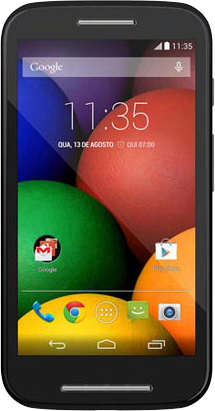
MOTO E

Awesome Motorola series MOTO X, MOTO G and now comes MOTO E that is an ideal phone for them who has never bought a smart-phone and want to own one. This is perfect buy for them having 4 GB internal memory and 1 GB RAM, 4.3 inch display screen 540 x 960 pixels, Qualcomm Snapdragon 200 chipset, Dual-core 1.2 GHz Cortex-A7, microSD upto 32GB card slot and camera 5MP.

3) HTC Desire 310:-


HTC Desire 310

HTC being a big brand name you can go with this phone in your budget. A perfect match for your professional start-up having 4 GB internal memory, 512 MB/ 1 GB RAM, 4.5 inch display screen, 480 x 854 pixels, Mediatek MT6582M chipset, Quad-core 1.3 GHz Cortex-A7, microSD, up to 32 GB card slot and camera 5MP.

4) Gionee M2:-


Gionee M2

If you are in a search of big inch screen device like a phablet then this is an obvious and best choice for you to buy this season having 4 GB internal memory, 1 GB RAM, 5 inch display screen, 480 x 854 pixels, Android OS, v4.2 (Jelly Bean) chipset, Quad-core 1.3 GHz Cortex-A7 CPU, microSD, up to 32 GB and camera 8 MP.

5) XOLO Q700s:-


XOLO Q700s

Another interesting smart-phone device, a good pick of this month to buy in an affordable rates having 4 GB internal memory, 1 GB RAM, 4.5 inch display screen, 480 x 854 pixels, Mediatek MT6582M chipset, Quad-core 1.3 GHz CPU, microSD, up to 32 GB and camera 8 MP. 

Top 5 Budget Smart-Phones to Buy This May 2014

Smart-Phones

Smart-Phones are like must these days and people with low budgets or people who has never own a smart-phone can actually buy any one of this phones.

Years back you could pick a good feature phone in this price range but now thanks to Android & Windows OS. Now people can buy good multi functionality smart-phones upto 10k. Again thanks to few good companies giving out budget rated smart-phones.

Top 5 Budget Smart-Phones to Buy This May 2014

1) Nokia Lumia 525:-


Nokia Lumia 525

A nice and cool looking Lumia phone with having 8 GB internal memory and 1 GB RAM, 4.0 inch display screen 400*800 pixels, Qualcomm MSM8227 chipset, Dual-core 1GHZ CPU, microSD upto 64GB card slot and camera 5MP. Perfect suit for you this month in your budget.

2) MOTO E:-


MOTO E

Awesome Motorola series MOTO X, MOTO G and now comes MOTO E that is an ideal phone for them who has never bought a smart-phone and want to own one. This is perfect buy for them having 4 GB internal memory and 1 GB RAM, 4.3 inch display screen 540 x 960 pixels, Qualcomm Snapdragon 200 chipset, Dual-core 1.2 GHz Cortex-A7, microSD upto 32GB card slot and camera 5MP.

3) HTC Desire 310:-


HTC Desire 310

HTC being a big brand name you can go with this phone in your budget. A perfect match for your professional start-up having 4 GB internal memory, 512 MB/ 1 GB RAM, 4.5 inch display screen, 480 x 854 pixels, Mediatek MT6582M chipset, Quad-core 1.3 GHz Cortex-A7, microSD, up to 32 GB card slot and camera 5MP.

4) Gionee M2:-


Gionee M2

If you are in a search of big inch screen device like a phablet then this is an obvious and best choice for you to buy this season having 4 GB internal memory, 1 GB RAM, 5 inch display screen, 480 x 854 pixels, Android OS, v4.2 (Jelly Bean) chipset, Quad-core 1.3 GHz Cortex-A7 CPU, microSD, up to 32 GB and camera 8 MP.

5) XOLO Q700s:-


XOLO Q700s

Another interesting smart-phone device, a good pick of this month to buy in an affordable rates having 4 GB internal memory, 1 GB RAM, 4.5 inch display screen, 480 x 854 pixels, Mediatek MT6582M chipset, Quad-core 1.3 GHz CPU, microSD, up to 32 GB and camera 8 MP. 

Wednesday, 14 May 2014

MOTO Phone


Motorola is in trend these days with its best selling smart-phone MOTO G. MOTO E recently launched with just $130 off contract having so less price with lots of good functionality and features.

The Prices are so reasonable made it people tempt to buy this smart-phone with all new latest stuff. Take a look at the specs of all the three MOTO's

Specifications of MOTO E, MOTO G and MOTO X


Moto G
MotoG
Moto E
MotoE

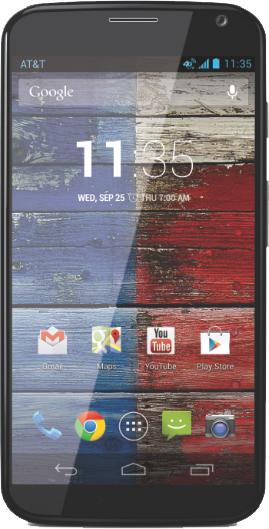
Moto X
MotoX
Screen 4.5-inch LCD 4.3-inch LCD 4.7-inch AMOLED
Resolution 720×1280 pixels 540×960 pixels 720×1280 pixels
OS Android 4.4 Android 4.4 Android 4.4
Storage 8/16GB 4GB 16/32GB
SD Card Slot No/Yes (with 4G LTE) Yes No
Processor 1.2GHz quad-core Snapdragon 400 1.2GHz dual-core Snapdragon 200 X8 chipset, 1.7GHz dual-core
RAM 1GB 1GB 2GB
Camera Front 1.3MP, Rear 5MP Rear 5MP Front 2MP, Rear 10MP
Bluetooth Yes, version 4.0 Yes, version 4.0 Yes, version 4.0
Battery 2070mAh 1980mAh 2200mAh
Price $180/$220 (with 4G LTE) off contract $130 off contract $300 off contract


Specifications of MOTO E, MOTO G, MOTO X

MOTO Phone


Motorola is in trend these days with its best selling smart-phone MOTO G. MOTO E recently launched with just $130 off contract having so less price with lots of good functionality and features.

The Prices are so reasonable made it people tempt to buy this smart-phone with all new latest stuff. Take a look at the specs of all the three MOTO's

Specifications of MOTO E, MOTO G and MOTO X


Moto G
MotoG
Moto E
MotoE

Moto X
MotoX
Screen 4.5-inch LCD 4.3-inch LCD 4.7-inch AMOLED
Resolution 720×1280 pixels 540×960 pixels 720×1280 pixels
OS Android 4.4 Android 4.4 Android 4.4
Storage 8/16GB 4GB 16/32GB
SD Card Slot No/Yes (with 4G LTE) Yes No
Processor 1.2GHz quad-core Snapdragon 400 1.2GHz dual-core Snapdragon 200 X8 chipset, 1.7GHz dual-core
RAM 1GB 1GB 2GB
Camera Front 1.3MP, Rear 5MP Rear 5MP Front 2MP, Rear 10MP
Bluetooth Yes, version 4.0 Yes, version 4.0 Yes, version 4.0
Battery 2070mAh 1980mAh 2200mAh
Price $180/$220 (with 4G LTE) off contract $130 off contract $300 off contract


Monday, 12 May 2014

Motorola

There is one day left to launch and images leaked of MOTO E. The pictures of the upcoming Motorola Moto E have been leaked by a Brazilian retailer days ahead of the launch of this smartphone.

The pictures show that the design and feel of this phone is very similar to Moto G and will also come in multi-colour shells that will be interchangeable.

MOTO E

MOTO E might come in 4.3 inch display, 3G, 5MP rear shooter, 1 GB RAM, dual-core Qualcomm chipset and will run Android 4.4 KitKat 

MOTO E -1

Assuming that Motorola will launch MOTO E tomorrow that is May 13 in an event having Indian Press as their invitee.

Indian press has been sent an invite by Motorola for an event which will be held on May 13. It is presumed that the company will launch Moto E on the same day.

MOTO E -2

It is said that MOTO E is likely to be in lesser than MOTO G that is expected. This phone will also be available at Flipkart online.

MOTO E Leaked Images Before its Launch on May 13

Motorola

There is one day left to launch and images leaked of MOTO E. The pictures of the upcoming Motorola Moto E have been leaked by a Brazilian retailer days ahead of the launch of this smartphone.

The pictures show that the design and feel of this phone is very similar to Moto G and will also come in multi-colour shells that will be interchangeable.

MOTO E

MOTO E might come in 4.3 inch display, 3G, 5MP rear shooter, 1 GB RAM, dual-core Qualcomm chipset and will run Android 4.4 KitKat 

MOTO E -1

Assuming that Motorola will launch MOTO E tomorrow that is May 13 in an event having Indian Press as their invitee.

Indian press has been sent an invite by Motorola for an event which will be held on May 13. It is presumed that the company will launch Moto E on the same day.

MOTO E -2

It is said that MOTO E is likely to be in lesser than MOTO G that is expected. This phone will also be available at Flipkart online.

Tuesday, 6 May 2014

Diabetes

Many people have diabetes, nearly 26 million people in US have diabetes, a disease in which body stop using glucose for energy and due to that insulin injections, pills, tablets are more in intake to the body putting you in helpless situation for lifetime medication for Diabetes.

But you can keep things in your control and may be some miracle can vanish Diabetes from your body. There are some ways to keep it in control. How about your smart-phone in your help to track your sugar levels and reminders of medication.

There are apps that can help you track and control this disease. Check out some good apps for Diabetes. We have got a mixture of iOS and Android apps for you. Take a look and get it for yourself and help yourself better.

Best Free iOS and Android Apps for Diabetes

1) mySugr Companion:-


mySugr App

The diabetes manager that focuses on on your diabetes data useful in your daily life with fun, gamification and instant feedback. It also keeps you motivated and make you involved in your therapy to reach your personal goals.

Price: Free
Download here for iOS and Android


2) Diabetes Pal:-


Diabetes Pal

Diabetes Pal helps track, analyze, and share blood glucose, medication, and food data manually AND automatically. With this app in hand, you or your loved ones can view every reading you’ve taken.

Price: Free
Download here for iOS and Android

3) Glucose Buddy:-


Glucose Buddy App

Glucose Buddy is a data storage app through which users can track glucose numbers, carbohydrates, insulin dosages and physical activities. An added bonus is users can view this data at any time though their online accounts.

Price: Free
Available for iOS and Android

4) MedSimple:-


MedSimple App

With MedSimple Lite you can find generic versions of brand-name meds that can save you money each month, and access the MedSimple Drug Discount Card! Upgrade to MedSimple Premium and you’ll get money-saving coupons and Patient Assistance Programs that can save you even more!

Price: Free
Available for iOS and Android

Best Free iOS & Android Apps for Diabetes

Diabetes

Many people have diabetes, nearly 26 million people in US have diabetes, a disease in which body stop using glucose for energy and due to that insulin injections, pills, tablets are more in intake to the body putting you in helpless situation for lifetime medication for Diabetes.

But you can keep things in your control and may be some miracle can vanish Diabetes from your body. There are some ways to keep it in control. How about your smart-phone in your help to track your sugar levels and reminders of medication.

There are apps that can help you track and control this disease. Check out some good apps for Diabetes. We have got a mixture of iOS and Android apps for you. Take a look and get it for yourself and help yourself better.

Best Free iOS and Android Apps for Diabetes

1) mySugr Companion:-


mySugr App

The diabetes manager that focuses on on your diabetes data useful in your daily life with fun, gamification and instant feedback. It also keeps you motivated and make you involved in your therapy to reach your personal goals.

Price: Free
Download here for iOS and Android


2) Diabetes Pal:-


Diabetes Pal

Diabetes Pal helps track, analyze, and share blood glucose, medication, and food data manually AND automatically. With this app in hand, you or your loved ones can view every reading you’ve taken.

Price: Free
Download here for iOS and Android

3) Glucose Buddy:-


Glucose Buddy App

Glucose Buddy is a data storage app through which users can track glucose numbers, carbohydrates, insulin dosages and physical activities. An added bonus is users can view this data at any time though their online accounts.

Price: Free
Available for iOS and Android

4) MedSimple:-


MedSimple App

With MedSimple Lite you can find generic versions of brand-name meds that can save you money each month, and access the MedSimple Drug Discount Card! Upgrade to MedSimple Premium and you’ll get money-saving coupons and Patient Assistance Programs that can save you even more!

Price: Free
Available for iOS and Android